From a website form to a CRM record a salesperson can use.
Connecting a form to a CRM takes an afternoon. Deduplication, enrichment, routing and assignment are the rest of the project, and they are where the value actually sits.
“Connect the contact form to the CRM” is the most common automation request a web agency receives, and it is the one most likely to be underestimated. The connection itself takes an afternoon. Almost every form builder posts to a webhook and every CRM has a create-contact endpoint.
The work is everything between those two points. A lead that arrives in the CRM as an unowned record with a name, an email and a free-text message is not a lead a salesperson can act on. Somebody still has to read it, work out whether the company is already a customer, decide who should handle it and tell that person. Automating the transport while leaving all of the judgement manual produces a tidier version of the same problem.
The stages, and the decision each one hides.
| Stage | The decision it requires | What breaks without it |
|---|---|---|
| Capture | Accept the payload and acknowledge fast | Timeouts, and the form provider retrying |
| Filter | What counts as spam, and what happens to it | Sales stops trusting the notifications |
| Validate | Which fields are genuinely required | Records that cannot be contacted |
| Normalise | The canonical format for emails, phones, domains | Deduplication silently fails |
| Deduplicate | Which field decides that two records are one | The same company appears four times |
| Enrich | Which attributes justify the cost per lookup | Routing has nothing to route on |
| Route | The rule that maps a lead to an owner | Everything lands in one queue |
| Assign | What happens when the chosen owner is unavailable | Leads sit unowned over a holiday |
| Notify | Which channel, and how much context is included | Somebody has to open the CRM to learn anything |
| Log | What is recorded about why this happened | Nobody can explain a routing decision later |
Most projects implement capture, validate and notify, then stop. The value is concentrated in the middle five.
Acknowledge first, process afterwards.
Form providers expect a fast response and retry when they do not get one. If the endpoint enriches, queries the CRM and posts to Slack before responding, a slow third-party lookup produces a timeout, and the retry produces a duplicate.
Accept the payload, store it, return 200, and do the work in a second step. This single decision removes an entire class of duplicate-lead problems before any deduplication logic exists.
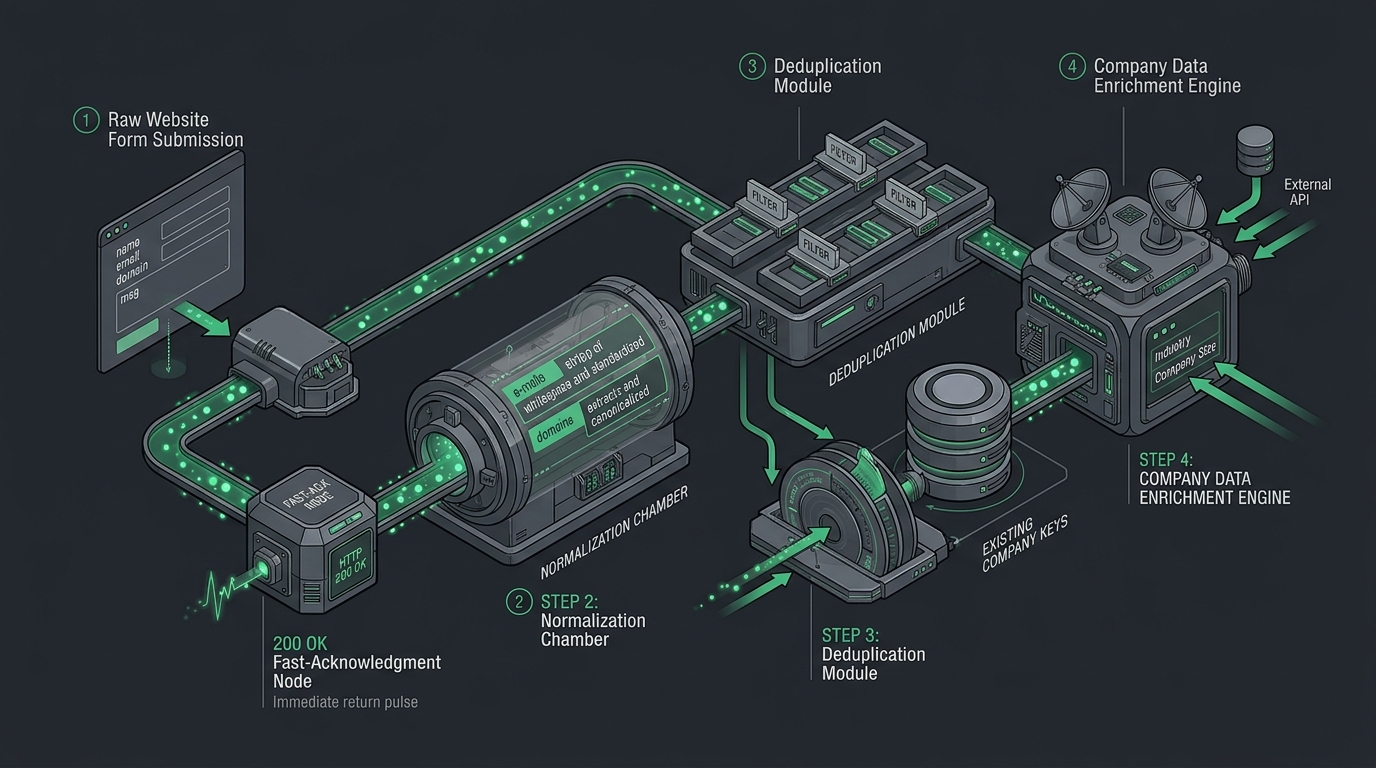
The middle five, in order.
Normalisation
Lowercase the email. Strip whitespace. Extract the domain and discard the subdomain where appropriate. Parse the phone number into a consistent international format. Trim the company name of its legal suffix for matching purposes, while keeping the original for display.
None of this is interesting, and all of it is load-bearing. Deduplication compares strings. If the strings were never normalised, the comparison fails and every downstream stage inherits the error.
Deduplication
Decide what makes two records the same thing, and be explicit that email and company are different questions.
Email is the reliable key for a person. Company is harder. Email domain works well, provided free-mail domains are excluded from the match, because otherwise every lead using a personal address is matched to the same imaginary company.
Then decide what happens on a match. A new enquiry from an existing contact usually should not create a second contact. It should attach to the existing one, and it should probably reach whoever already owns that relationship rather than the next person in the rotation. That rule alone prevents the most embarrassing outcome in lead automation, which is two salespeople contacting the same company in the same week.
Enrichment
Enrichment exists to support routing. If nothing downstream uses the company size, do not pay to look it up.
Useful attributes are usually the ones a routing rule needs: company size, industry, country and whether the domain already exists in the CRM. Providers return partial data and occasionally nothing at all, so every enriched field needs a defined default and the workflow must continue when the lookup fails. Enrichment is an enhancement. It is never a dependency.
Routing and assignment
This is where the actual business logic lives, and where the client’s real process finally becomes visible. Common rules are by territory, by company size, by product interest, by language, or round-robin within a team.
Two cases decide whether the system is trusted. An existing customer or open opportunity should reach the person who already owns it, not the rotation. And the chosen owner may be on holiday, so there needs to be a fallback, plus an unassigned queue that someone is responsible for checking.
Write the rules down with the client before building them. This conversation frequently reveals that the sales team does not currently agree on how leads are shared.
Logging
Record what the workflow decided and why: the enrichment values it received, the rule that matched, the owner it selected, and whether a duplicate was detected. Six weeks after launch somebody will ask why a particular lead went to a particular person, and without this the honest answer is that nobody can tell.
Notify with enough context to act.
A notification that says a new lead has arrived and links to the CRM has moved the work rather than removed it. A useful one carries the name and company, the enriched attributes that mattered, the message the person actually wrote, the rule that assigned it and a direct link to the record.
Send it to the assigned owner, not to a channel where everybody assumes somebody else is handling it.
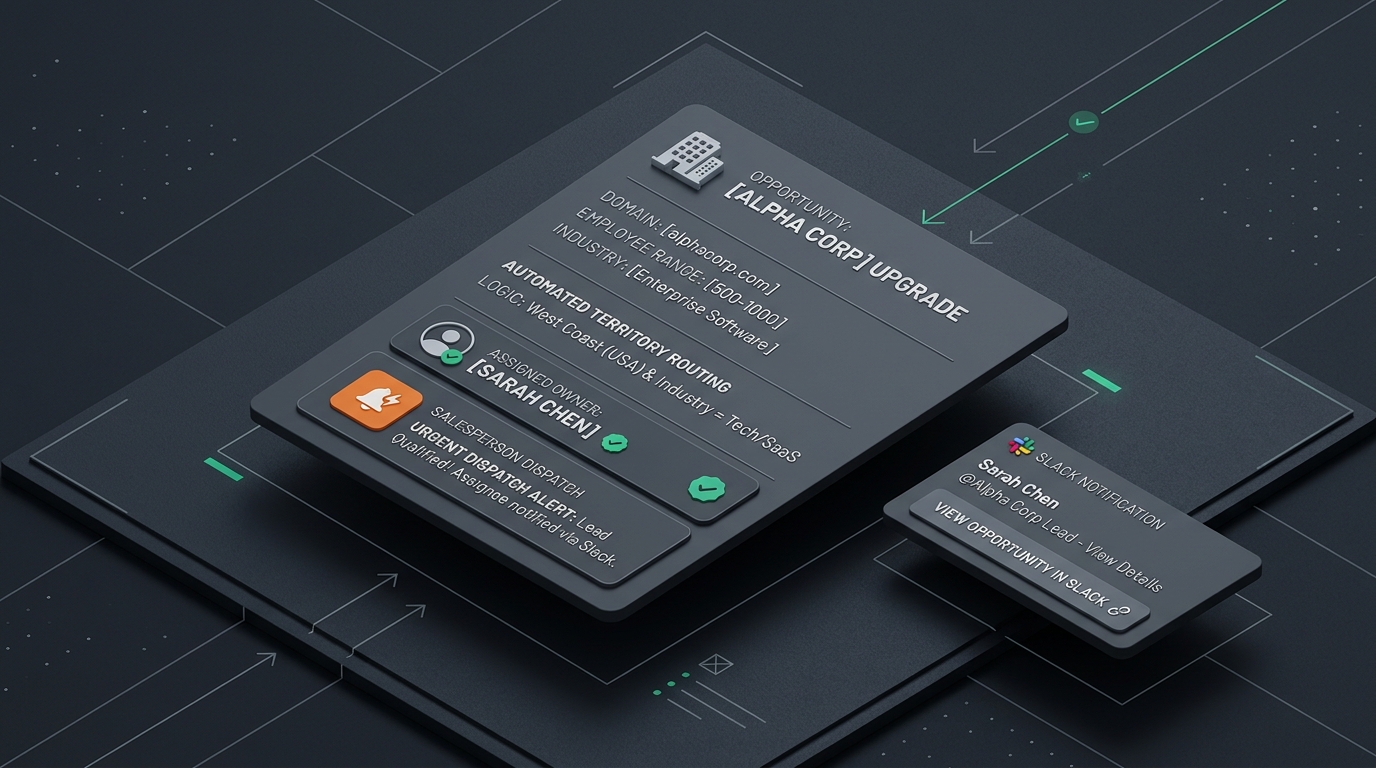
What this looks like running.
We built a version of this pipeline as a demonstration. A Webflow form submission is enriched with company context, qualified, routed by fit, written to HubSpot as a deal and sent to the assigned owner in Slack. Two details are worth borrowing: the routing rules live in a lookup table the agency can edit rather than inside a prompt, and the reason a lead was prioritised is written onto the CRM record so a salesperson can see it and disagree with it.
It is published as AI lead routing, and it is a demo implementation rather than a client engagement. No performance figures are claimed for it, because results depend entirely on the volume and the sales process it runs against.
Where the value sits.
The transport layer is the easy part and it is the part most quotes are priced against. Deduplication, routing and assignment are where a lead pipeline either earns its place or quietly becomes another notification the sales team ignores.
If a client has asked your agency for something like this and you would rather not own the middle five stages, send us the requirement as they described it. We will tell you how we would approach it, what the routing rules would need to cover and what the build would involve. Send it here, and a person will read it.
Related notes
When a Zapier workflow stops being enough.
Most automation should stay in a no-code tool. This is how to tell a design problem from a missing connector from a genuine ceiling, and when a migration is not worth doing.

Build an LLM step that returns structured JSON you can trust.
A model in the middle of a workflow returns whatever it decided to write. Build the step so the node after it always receives the shape it was expecting.
Build a document extraction pipeline with a confidence gate.
A pipeline that extracts fields at ninety percent accuracy and writes all of them has not saved anybody time. It has created a data problem for later.